
For TradingView traders
A Futures Trading Journal for TradingView Traders
You already trade on TradingView in your browser. Atium Bot keeps your journal one click away in the same window, and with auto-detect on, it drafts each trade for you to review.
Atium is an independent product and is not affiliated with, endorsed by, or sponsored by TradingView. TradingView is a trademark of its owner.
Charts by TradingView
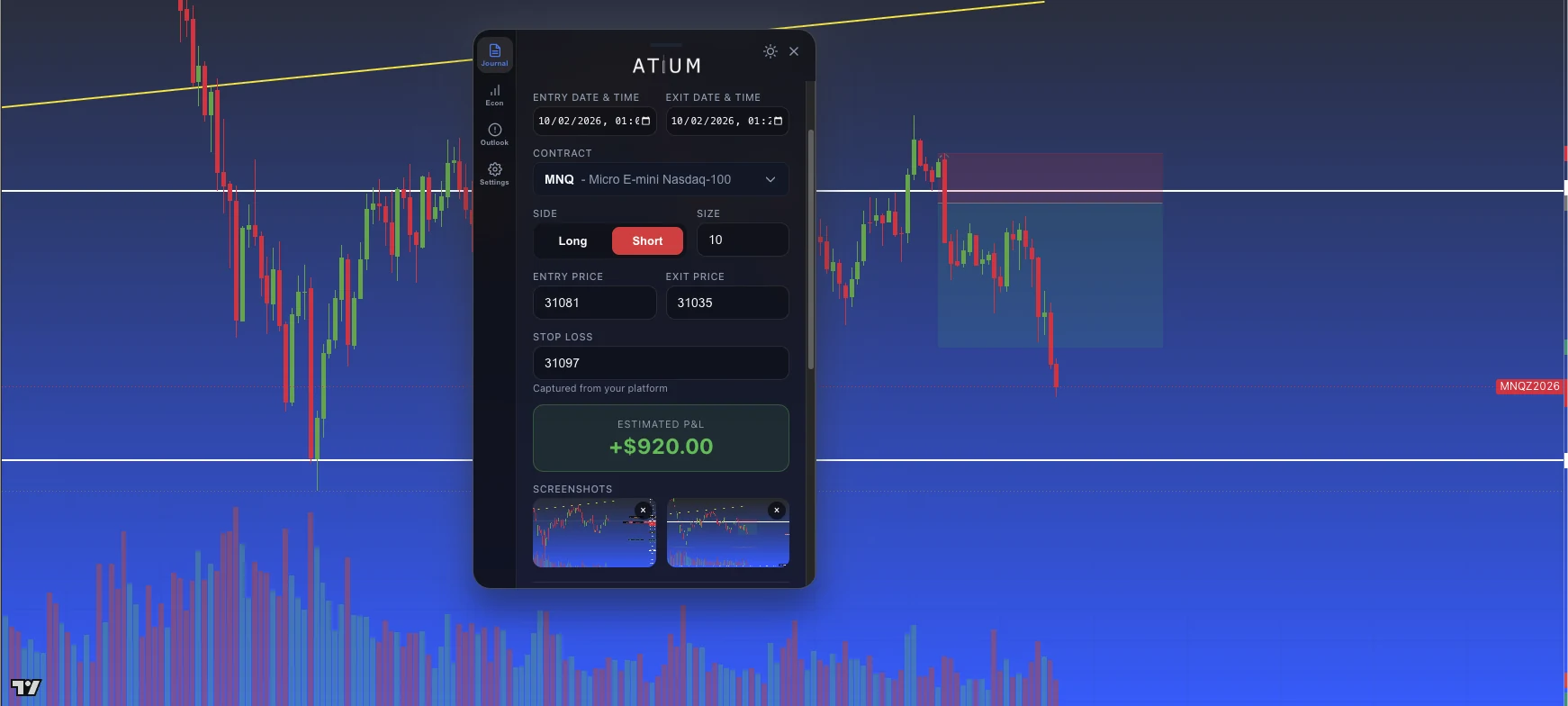
Journal trades where you trade
Atium Bot opens as its own floating panel in your browser. With auto-detect on, it notices the order confirmations for your own trades and drafts the entry — contract, side, price, size, time, and your stop when the confirmation shows it — with entry and exit chart screenshots attached. You review it and save. You can also log a trade by hand from the same form.
- Auto-detect is opt-in: turn it on once in the extension settings
- Bar Replay sessions are detected as backtests and kept out of your live stats
- Collapses to a small floating button when you don't need it
Context in the same panel
Check the economic calendar with prior, forecast, and actual values before you trade, and read the Grok-generated ES/NQ outlook — posted on weekdays around 9 AM ET before the open and again after the close — with key levels and the headlines that moved price.
Frequently asked questions
Ready to trade with an edge?
Start your 14-day free trial. A card is required to start, and you pay nothing if you cancel before it ends.